Telegram Post Reactions: A Guide to Using and Managing Them in 2026

Last updated: November 2026
Enabling Telegram post reactions is free and takes seconds in your channel's settings; buying them for social proof can cost as little as $0.0110 per 1,000. Telegram post reactions are emoji that users can add to messages, providing a quick way to share feedback and a key signal of audience engagement. For channel administrators, managing these reactions involves choosing which emoji to allow, using custom branded emoji, and understanding the role of both organic and purchased engagement.
Key Takeaways
- Channel admins have full control over reactions, including enabling or disabling them and selecting which specific emoji are available.
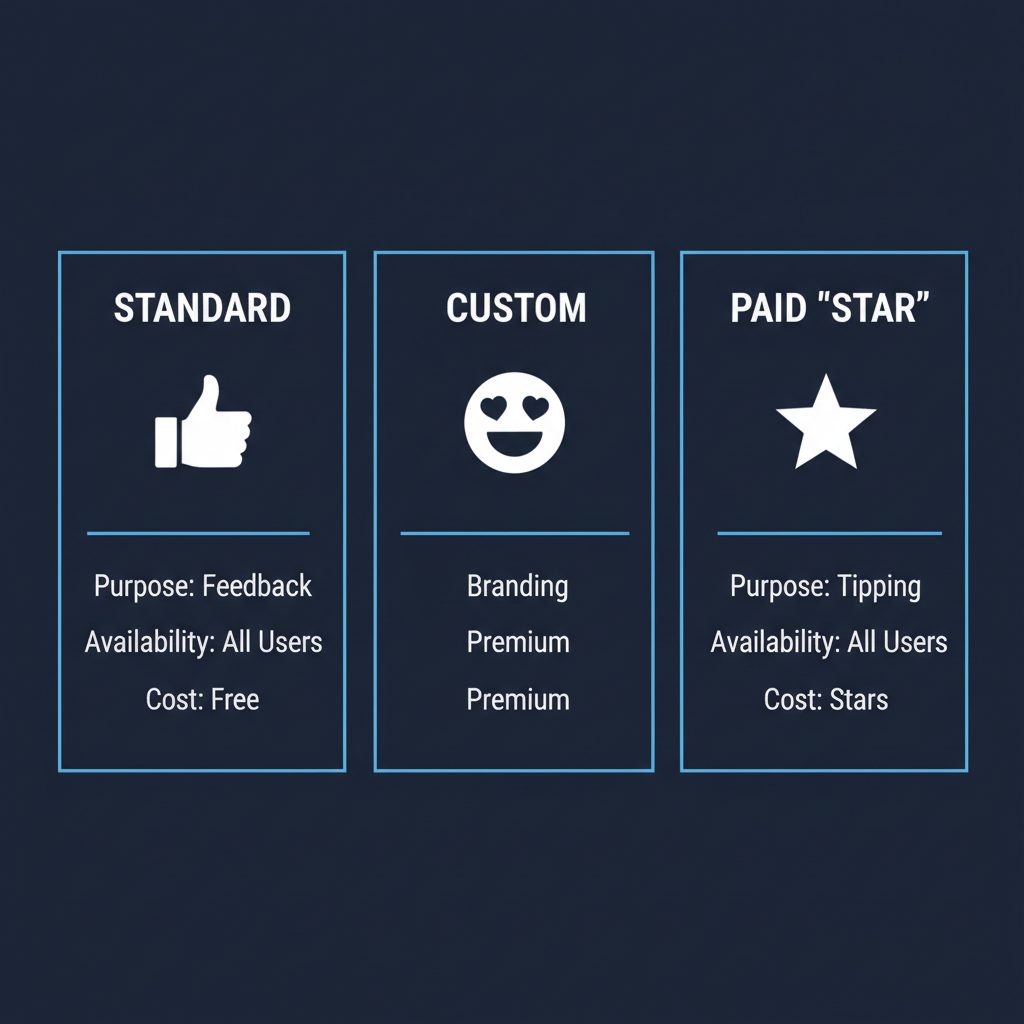
- Telegram supports three reaction types: standard emoji, custom emoji unlocked via channel boosts, and paid "Star" reactions for tipping.
- The "Maximum Number of Reactions" setting limits the variety of emoji icons (up to 11) on a post, not the total number of reactions from users.
- Purchased reactions from panel services are used to create social proof and can cost as little as $0.01 per 1,000, but do not represent organic user interest.
- Telegram Premium users have expanded reaction capabilities, including the ability to use any custom emoji and add up to three reactions to a single message.
What are the different types of Telegram reactions?
Telegram's reaction system has evolved beyond a simple thumbs-up. Channel owners can now work with three distinct categories of reactions, each serving a different purpose. Understanding the differences is essential for managing community feedback and channel branding.
1. Standard Emoji Reactions: These are the default, universally recognized emoji available to all Telegram users. Admins select a subset of these for their channel from a pre-approved list. Their main advantage is clarity; everyone understands what a 👍 or ❤️ means.
2. Custom Emoji Reactions: Channels can offer their own unique, branded emoji as reactions. These are unlocked by increasing a channel's level with boosts from Premium subscribers. According to Telegram's official blog, each new level grants the ability to add more custom reactions. Telegram Premium subscribers can use these custom emoji and thousands of others.
3. Paid "Star" Reactions: This feature allows followers to tip a channel owner using Telegram's virtual currency, Stars. A paid Star reaction is a one-time tip and does not grant the user a subscription or any special access. It is a direct monetization tool, separate from community engagement.
Here is a comparison of the three reaction types:
| Feature | Standard Reactions | Custom Reactions | Paid "Star" Reactions |
|---|---|---|---|
| Purpose | General feedback, universal sentiment | Branded engagement, community identity | Direct author tipping, monetization |
| Availability | All users (within admin-set limits) | Primarily Telegram Premium users | All users in enabled channels |
| Emoji Source | Standard emoji set | Channel's custom emoji packs | A single "Star" icon |
| Cost to User | Free | Free | Costs Telegram Stars |
| Unlocked By | Enabled by default | Channel Boost Levels | Admin enables in settings |
| Admin Control | High (can select specific emoji) | Moderate (can add/remove from slots) | Binary (On/Off) |
How can you enable and customize reactions in your channel?
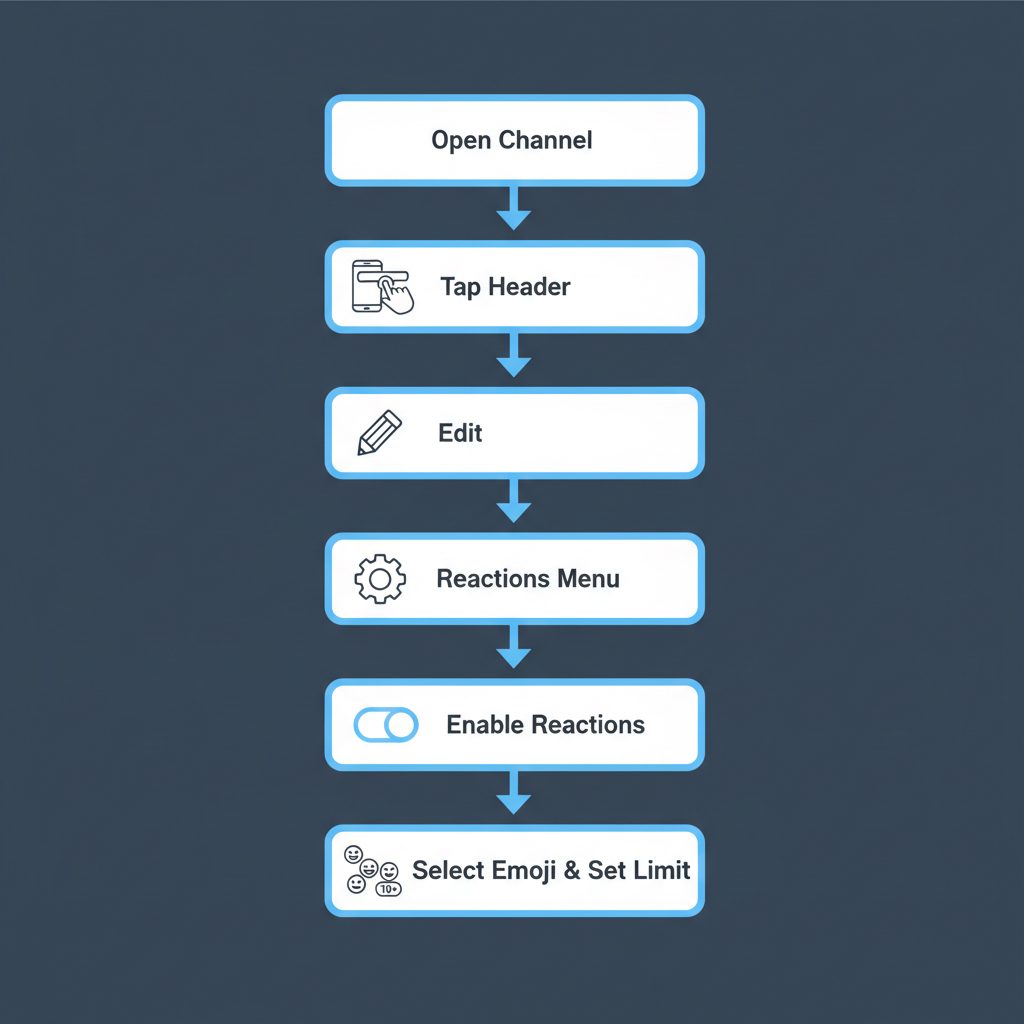
Setting up reactions is a straightforward process managed entirely within your channel's administration panel. Telegram's official updates confirm that admins control reactions from their channel's Info Page. Following these steps gives you precise control over the feedback your audience can provide.
- Navigate to Channel Settings: Open your Telegram channel. Tap on the channel header at the top to open its main info page.
- Select the Edit Menu: Tap the 'Edit' button. This is typically represented by a pencil icon in the top-right corner on both Android and iOS.
- Open the Reactions Menu: In the edit screen, find and select the 'Reactions' option. If you don't see it, ensure your Telegram app is updated to the latest version.
- Enable or Disable Reactions: The first option is a master toggle to turn all reactions on or off for your channel. To proceed with customization, ensure this is set to 'On'.
- Select Available Emoji: You will see a list of standard emoji. Tap on each emoji to add or remove it from the list of reactions your subscribers can use. A checkmark indicates it's active.
- Set the Maximum Number of Reaction Types: Use the slider or input field to define how many different emoji types can be displayed under a single post. This is a strategic choice we explore below.
What does the 'Maximum Number of Reactions' setting mean?
This setting often causes confusion. The "Maximum Number of Reactions" does not limit the total number of people who can react. Instead, it limits the variety of different emoji icons that can appear on a single post. Telegram allows a channel admin to set this cap at a maximum of 11 unique reaction types per post.
For example, if you set the maximum to 3, and your post receives 👍, ❤️, and 🎉 reactions, any subscriber who tries to add a fourth type of reaction, like 🔥, will be unable to do so. They can still add to the existing three types, but no new icons will appear.
This mechanism encourages focused feedback. A lower limit (e.g., 3-5) prevents posts from being cluttered with dozens of different emoji, making the overall sentiment easier to read at a glance.
For most channels, a limit between 3 and 6 is effective. It provides choice without creating visual noise. In contrast, channels focused on humor or memes might opt for the maximum of 11 to encourage more creative responses.
The Role of Purchased Reactions in Channel Growth
Organic reactions are a valuable signal of a healthy, engaged community. However, new or smaller channels often struggle to gain the initial traction needed to generate this engagement. This is where purchased reactions can play a role.
A post with zero reactions and 1,000 views looks less credible than a post with 50 reactions and 1,000 views. This initial boost makes organic visitors more likely to engage.
This psychological primer is why channel managers buy reactions. It is important, however, to distinguish between different types of purchased engagement. While a guide on buying Telegram comments focuses on generating discussion, reactions are about instant sentiment signals.
Operators must be cautious. The market has low-quality services that use unstable bots, which can lead to reactions disappearing after a few hours. Analysis of the market for Telegram fake reactions shows that quality is determined by account stability and delivery patterns. For resellers, understanding these nuances is key to profitability, as explained in guides on reselling Telegram reactions.
Where TGRU's Telegram Reactions Service Fits
Panel services like TGRU provide a tool for channel managers to add social proof on demand. The goal is not to simulate a real, thriving community but to provide the initial engagement metrics that help a post or channel overcome the "empty room" problem.
As of November 2026, TGRU offers Telegram Reactions (Mix Positive) starting at $0.0110 per 1,000. The service delivers a mix of positive emoji (like 👍, ❤️, 🎉, 🔥) from a global pool of accounts to a specific post link. There is also an option for negative reactions at a different price point.
This service is for channel owners, marketers, or resellers who need to quickly and affordably increase the reaction count on a post. It's a quantitative tool. The service does not deliver targeted users, generate sales leads, or create long-term organic followers. It simply adds a number to your post's engagement metrics.
Operators who need genuine audience feedback or long-term community growth should focus on content strategy and organic promotion. A service like this is a tactical supplement, best used to amplify key announcements or give new content an initial push.
Custom vs. Standard Reactions: A Strategic Choice
While standard emoji are universally understood, custom emoji offer a powerful branding opportunity. According to Telegram's official documentation, Telegram Premium users can use an unlimited variety of custom emoji and can add up to three reactions to a single message, giving them more expressive power.
For a channel, offering custom reactions requires investing in channel boosts. This can be a worthwhile strategy for established brands or creators with a loyal following. A custom emoji that reflects an inside joke or brand logo can foster a stronger sense of community identity. However, for new channels, sticking with a curated list of standard emoji is more practical. It ensures all users, not just Premium subscribers, can participate fully and that the meaning of the feedback is clear.
Channel Boosts Unlock Reactions: Each time a channel levels up through boosts from Premium subscribers, it unlocks one additional slot for a custom reaction. This creates a direct incentive for a community to support a channel, tying their contributions to a visible, interactive reward.
A simple first-week plan
If you're just starting to use reactions, follow this simple plan to get started effectively.
- Day 1: Enable reactions in your channel. Start with a small, curated list of 5-7 universally positive and relevant emoji (e.g., 👍, ❤️, 🎉, 🔥, 🤔).
- Day 3: Publish your next piece of content and actively monitor which of the available reactions your audience uses most. Note any patterns.
- Day 5: For a high-importance post, consider a small test order of purchased reactions to establish initial social proof. Compare the organic engagement on this post to previous ones.
- Day 7: Review the week's engagement. Adjust your available emoji list based on what your audience actually used. If nobody used the '🤔' reaction, consider swapping it for something else.
Frequently asked questions
Are Telegram channel reactions anonymous?
Yes. Neither subscribers nor the channel's admins can see who left a reaction in a channel: Telegram's API refuses to list channel reactors to prevent deanonymization, so only the count per emoji shows. In groups, members can tap a reaction to see who sent it.
Can I see who reacted to my Telegram post?
Not in a channel. Even admins only see how many times each emoji was used, because Telegram does not list who reacted to channel posts. The exception is paid Star reactions, whose top senders are shown unless they chose to stay anonymous. In a group, anyone can tap a reaction to see who sent it.
How many reactions can you have on a Telegram post?
There is no limit to the total number of reactions a post can receive. The limit an admin sets (up to 11) refers to the number of different emoji types that can be displayed. A post can receive millions of reactions, but they will be distributed among the allowed emoji icons.
Why can't I add reactions on a Telegram channel?
The most common reason is that the channel administrator has disabled reactions entirely. Alternatively, they may have restricted them to a very small set of emoji. If you're a Telegram Premium user, you have more options, but the admin's settings are the final rule for their channel.
What's the difference between a paid reaction and a subscription?
A paid "Star" reaction is a one-time tip to support a creator for a specific post. It does not grant any ongoing benefits. A subscription, which channels can sell natively for Telegram Stars or through a third-party bot, grants a member access to a private channel or exclusive content for a recurring fee.
Can I buy negative Telegram reactions?
Yes, some panel services offer packages for negative reactions (e.g., 👎, 😠). TGRU lists a Mix Negative reactions service. Use reactions only on your own posts; pointing negative reactions at someone else's channel is harassment and can break Telegram's Terms of Service.