How to Create a Telegram Poll That People Actually Vote On

Last updated: November 2026
To create a poll on Telegram, open a chat or channel, tap the attachment icon, and select 'Poll'. You then enter your question, add answer options, and choose your settings before sending.
While the technical steps are simple, creating a poll that people actually vote on is the real challenge. Many channel owners create polls that get minimal interaction, failing to generate the engagement or feedback they need. This guide covers the complete process: the mechanical steps to create a poll, the strategic settings you must understand, and what to do when your audience isn't participating.
What You Need Before You Start
Before creating a poll, ensure you have the necessary permissions. In a private chat or a group you own, you can create polls freely. However, to post a poll in a Telegram channel, you must be an administrator with posting permissions. Without this, the option to create a poll will not be available to you. Always check your role and permissions within the channel's settings first. This is a common point of failure for new managers.
How to Create a Poll on Telegram: Step-by-Step
Creating a poll is a built-in Telegram feature that requires no external bots or tools. The process takes less than a minute once you know the steps.
- Open the Target Chat or Channel: Navigate to the group or channel where you want the poll to appear. Remember, you need admin rights to post in a channel.
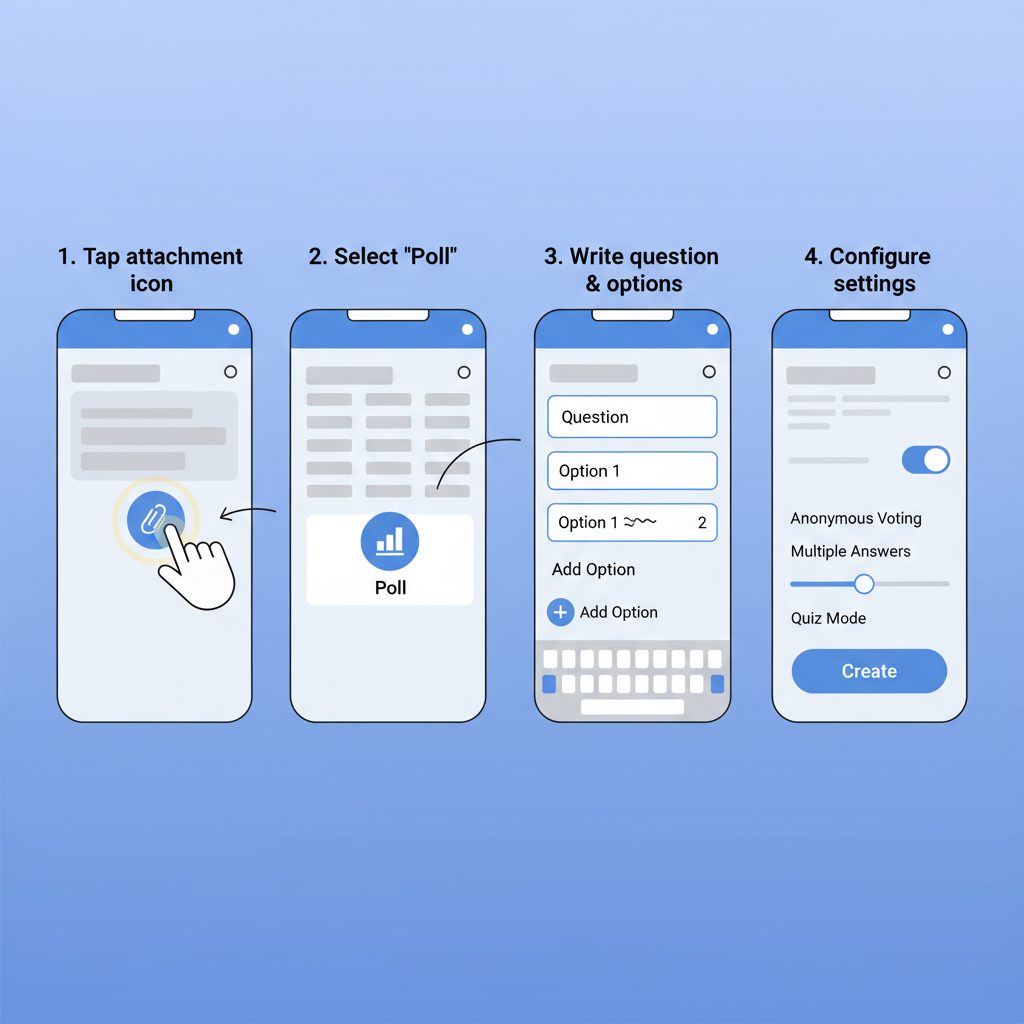
- Access the Poll Feature: Tap the attachment icon (a paperclip) in the message input field. From the menu that appears, select the 'Poll' option.
- Enter Your Question: A new window will open. In the 'Poll Question' field, type the question you want to ask. According to Telegram's limits, the question can be up to 300 characters long.
- Add Answer Options: Below the question, you will see fields for 'Answer Options'. You can add up to twelve distinct options, and each option is limited to 100 characters. Add at least two options to proceed.
- Configure Poll Settings: Below the answer options, you will find three key settings:
- Anonymous Voting: If enabled, votes are anonymous. If disabled, group members can see who voted for which option. In channels, votes are always anonymous.
- Multiple Answers: Enable this if you want users to be able to select more than one option.
- Quiz Mode: This transforms the poll into a quiz with one or more correct answers. When a user selects the correct option, a confetti animation appears. You must select the correct answer before publishing.
- Publish the Poll: Once you have configured your poll, tap 'Send' or 'Create' at the top of the screen. The poll will immediately appear in the chat or channel. Be certain of your text and settings, as native Telegram polls cannot be edited once published. A mistake requires deleting it and starting over.
Understanding Telegram Poll Settings and Limits
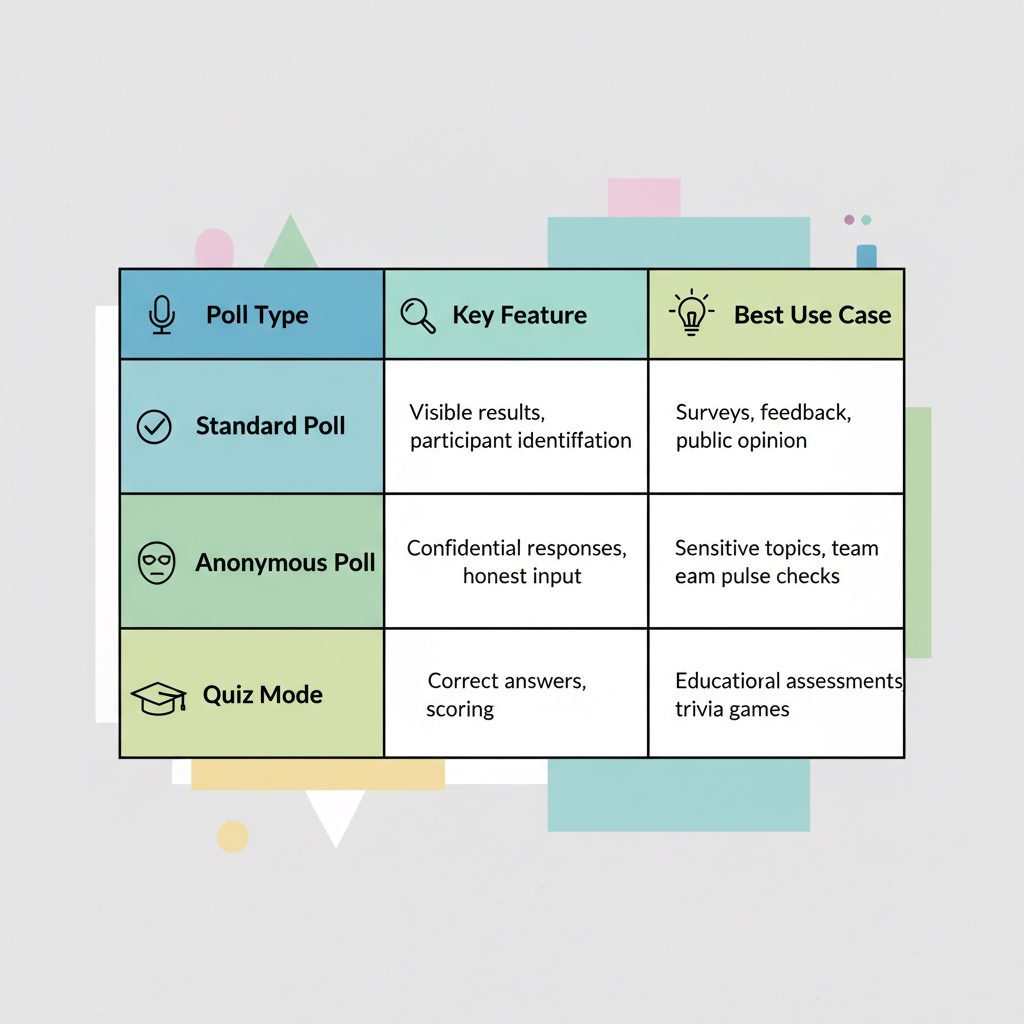
Choosing the right poll type is essential for achieving your goal, whether it's gathering opinions, running a contest, or educating your audience. Each setting serves a different purpose.
| Feature | Description | Best Use Case |
|---|---|---|
| Visible Votes | A poll where group members can see who voted for each option. In channels, all polls are anonymous. | Gauging consensus within a known team or community group where accountability is desired. |
| Anonymous Poll | The default setting where individual votes are hidden from other users. | Collecting honest feedback on sensitive topics or from a large, public audience. |
| Multiple Answers | Allows users to select more than one option in their vote. | "Check all that apply" style questions, feature requests, or preference gathering. |
| Quiz Mode | A poll with one or more designated correct answers. Users see if they are right or wrong instantly. | Educational content, community trivia, contests, and user knowledge tests. |
Telegram's official blog on the feature update highlights the 'Visible Votes' option, stating, "you can create polls that allow everyone in the group to see who voted for what." This transparency is useful for small, private groups but is disabled in public channels to protect user privacy. (Telegram Blog, 2020)
Beyond these settings, be aware of the technical constraints:
- Question Length: 300 characters maximum.
- Answer Option Length: 100 characters maximum per option.
- Number of Options: 12 options maximum.
- Editing: Not possible after publishing. You must delete and recreate the poll.
Why Aren't People Voting on My Polls?
The most common issue for channel owners is not creating the poll, but getting a meaningful number of votes. If your polls consistently see low engagement, the cause is usually one of the following:
- Low Audience Size: A new or small channel simply lacks the active user base to generate significant votes. Without a critical mass of members, even the best poll will fail. Getting your first 1,000 members on Telegram is a prerequisite for any real engagement.
- Uninteresting Questions: Generic or irrelevant questions get ignored. Your polls must be directly related to your channel's niche and provide value or entertainment to your subscribers.
- Poor Visibility: If your poll is buried among dozens of other posts, users may miss it. Pinning the poll for a set period can dramatically increase its visibility and participation rate.
- Poll Fatigue: Asking too many questions too frequently can cause your audience to tune out. Use polls strategically, not as daily filler content.
When organic engagement is low, fix the inputs first: a sharper question, a pinned post and a clear reason to vote.
Getting a Conversation Going Around Your Poll
If a poll sits in a quiet channel, a few starter comments under the post can invite real subscribers to explain their vote. TGRU's Telegram Comments line is built for seeding that first discussion. Do not buy votes for a poll: purchased votes change the result, which misleads your audience and breaks any contest or giveaway that relies on a fair count. If you need honest feedback, keep the poll native and let only real subscribers vote.
A Simple First-Week Plan
To integrate polls effectively into your channel strategy, follow a structured approach.
- Day 1: Publish an Engaging Poll. Create your first poll. Ask a compelling, relevant question with clear options. Pin it to your channel for 24 hours to maximize visibility.
- Day 2: Cross-Promote. Share the link to your Telegram post containing the poll on other social media platforms or in relevant communities to draw in external participants.
- Day 3: Analyze Initial Results. Check the vote count. If it's lower than expected, analyze why. Was the question weak? Was the timing off? This is the point to rewrite the question or repost it at a better time.
- Day 5: Test a Different Format. Create a second poll using a different type, like Quiz Mode. This helps you understand what format resonates best with your audience. The novelty of a quiz can often boost engagement.
- Day 7: Review and Refine. Compare the performance of both polls. Note the topics, formats, and times that generated the most interaction. Use this data to refine your future poll strategy.
Frequently Asked Questions
How do I create an anonymous poll on Telegram?
To create an anonymous poll, simply enable the "Anonymous Voting" toggle in the poll settings before you publish it. In Telegram channels, all polls are anonymous by default to protect user privacy. In groups, you have the choice to make votes visible or anonymous.
Can I see who voted on my Telegram poll?
Yes, but only in groups and only if you disable the "Anonymous Voting" option when creating the poll. If you create a poll with visible votes, all members of the group can tap on an option to see a list of members who voted for it. This feature is not available in channels.
What is Quiz Mode in Telegram polls?
Quiz Mode is a special poll setting that allows you to designate one or more correct answers. When a user selects the correct option, Telegram displays a confetti animation. It is ideal for running trivia, educational contests, or knowledge checks within your community, as confirmed by resources on the feature. (Responsly, 2024)
What are the character limits for Telegram polls?
A Telegram poll question is limited to 300 characters. Each answer option can be up to 100 characters long. You can include a maximum of twelve different answer options in a single poll. These limits are fixed within the Telegram platform.
Can I edit a poll after publishing it?
No, you cannot edit a native Telegram poll's question or answer options after it has been published. If you make a mistake, your only option is to delete the entire poll and create a new one. Therefore, it is important to proofread your content carefully before sending.